Best Ergonomic Mouse 2019 – J-tech Digital V628 [Gen 2 Vertical]
We start with the V628 Scroll Endurance vertical mouse by J-Tech Digital. This device is described as an endurance mouse. It is a definite pick if you sit for hours in your PC desk. The mouse is designed to ease with wrist pain or hand fatigue that comes with using a regular mouse. It allows the hand to feel comfortable through hours of clicking, scrolling, and tracking. V628 is the best carpal tunnel mouse you can find in the market.
This is one of the vertical mice that reduce the torsion of the wrist and forearm caused by extended use of other mice. It anchors the hand, thus reducing stress in the wrist area.
The mouse offers a more natural position which makes it effortless to use over a long time. It even includes a detachable palm rest that reduces drag on your desk’s surface. It is a custom palm rest that can be installed according to your liking. The rubber pad cushions the wrist so that you can align it perfectly with the mouse.
Apart from the ergonomic use, this mouse has some cool features. You get a corded device that is not prone to any lags that other wireless devices encounter. Just insert the USB plug, and the device is ready for use. Not everyone is good at installing drivers so you can skip that step with this mouse.
On this mouse, you’ll have thumb-controlled buttons which perform fast and easy back and forward browsing and navigation. It has a small build which gives the hand a natural grip. It has a scrolling wheel nested between the two buttons to make browsing a breeze.
When it comes to functionality, the mouse offers optional control of three sensitivity levels. You can switch from 600 to 1000 or 1600 DPI using the DPI button. You will have personalized control of the response times as well as a high-resolution sensor that offers reliable precision.
Aesthetically, you will like the compact design with a blue LED light that will look great on your desk. We also like that since it is smaller than regular mice, it fits nicely in your backpack or work briefcase. You can take it on business trips or from home to work, and so forth since it is lightweight and will be ready to use when you are.
The Scroll endurance is a mouse that’s tailored at a reasonable price. If you are looking to own an ergonomic mouse on a budget, then this model will do it. It does not make any compromises on the quality even if you won’t be digging deep into your pocket to buy it.
This mouse looks unusual, and it may take some time getting used to, but it eliminates real problems like RSI and is the best mouse for Carpal Tunnel Sufferers. It is also not an ambidextrous model, so only right-handed people will be able to use it.
All in all, this is a reliable, ergonomic mouse. Many users are satisfied with the way it feels and works. For anyone looking to reduce stress and twisting of the hand since it gives the hand a handshake position.
Still, there’s a complaint about the scroll wheel getting stuck. We have observed this as a design fault, but it’s easily fixable. It’s a do it yourself thing where you need to free the stopper that holds the wheel.
Pros
- Vertical design eliminates stress and fatigue to the hand and wrist
- Thumb-controlled buttons
- Three adjustable DPI
- Compatible with multiple devices
- Wired for plug and use
- Removable palm rest
Cons
- Not optimized for gaming
- Only for right-handed persons
Best Vertical Mouse- Sharkk Vertical
Style meets comfort is what the Shark is all about. Built specifically for right-handed users, the Sharkk supports natural hand positioning which eases with stress to the median nerve that runs through the center of the wrist. It has an innovative design which helps the hand sit comfortably as you use the mouse. It is even scientifically proved to reduce muscle strain when browsing for hours on your computer.
If you are already affected by using a traditional mouse, the Sharkk model will also come in handy to help alleviate symptoms of repetitive use. It allows the hand to go back to its natural form instead of rotating it and causing you pain. It follows a vertical design just like the Scroll Endurance, but with six buttons.
The buttons are smooth to offer fast-tracking and scrolling. The rubber pad allows the mouse to glide effortless making it easy to navigate on your computer. It will not also stick to the desk meaning you’ll have an easy time using it. This mouse includes next and previous buttons located at the side. It allows you to browse web pages much faster. This way, you can get through a load of work with less stress.
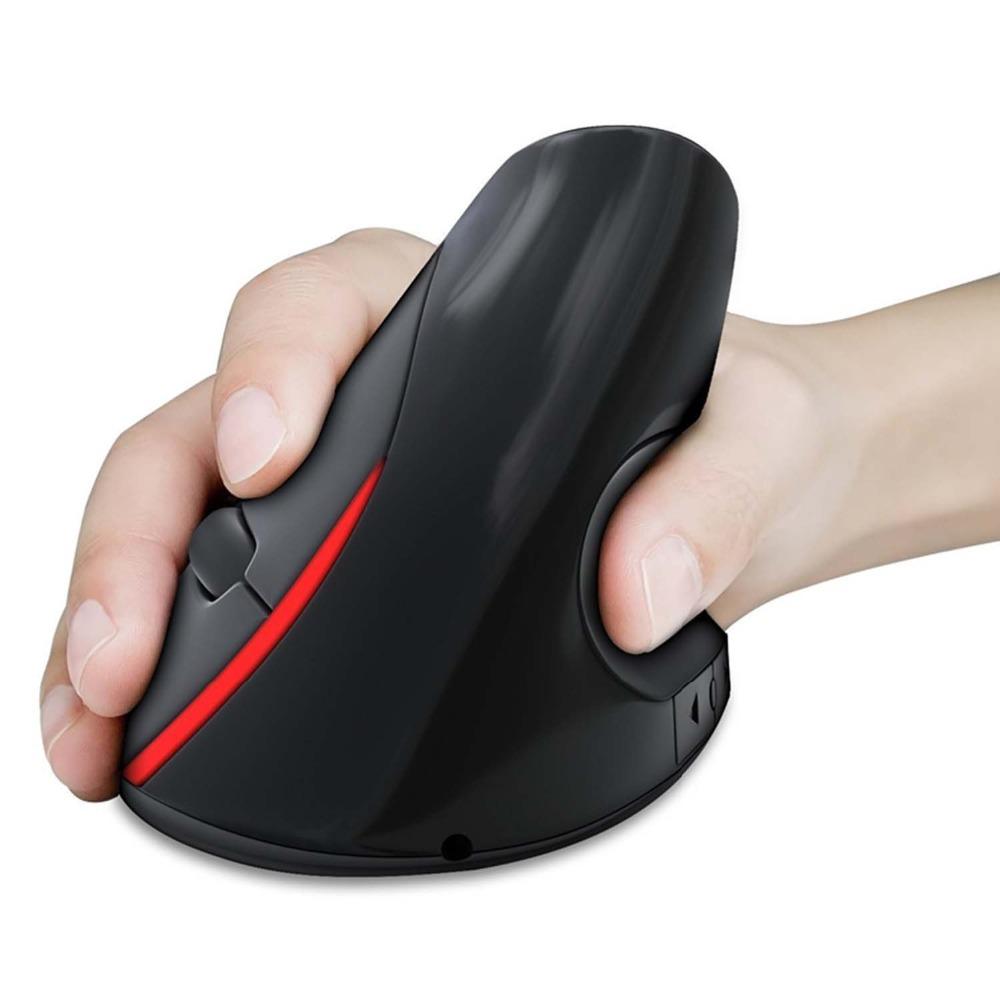
The Sharkk ergonomic mouse is one of the best in the wireless category. It connects via 2.4GHz RF wireless technology. It allows the mouse to work seamlessly without delays on your computer. The mouse is supplied with a plug-and-play nano receiver which connects directly to the USB port on your computer.
When it comes to compatibility, the Shark Ergo mouse is great with all versions of Windows, Mac OS X, and Linux. The mouse features optical tracking and adjustable DPI. It gives you a superior working experience where you can optimize the sensitivity from 800 to 1200 or 1600 DPI.
You will have a DPI switch that adjusts the DPI to a higher or lower setting. A faster pointing speed will come in handy when selecting huge chunks of work while a slower pointing speed will give you more precise work when you don’t want to select a large area of a photo or document. This feature is very important for color correcting and photo edits.
The Sharkk mouse operates using two AAA batteries that are not supplied. It provides an auto-sleep function which saves the battery life and extends its life. It integrates time-sensing technology which kicks in after 8 seconds. This eliminates the need to keep powering the mouse.
Satisfaction is guaranteed with the Sharkk brand. The company promises customer care support if you should experience any issues with the device. But note that it will lose connection when it automatically shuts off.
This device has a large grip and may not feel comfortable on small hands. If it feels good on your hands, the mouse will encourage you to hold it in the natural position. Now you can say goodbye to endless tension while operating a computer.
Pros
- Extended operation system compatibility
- Seamless wireless connection without delays
- Adjustable DPI settings
- Scientifically proven the best ergonomic mouse for wrist pain
- Auto-sleep feature conserves battery life
Cons
- It is not suitable for dominant lefties
- The large grip does not offer universal comfort for all-size hands
Best Ergonomic Wireless Mouse- HAVIT Wireless Vertical
After using a horizontal mouse for too long, you may notice your hands becoming weak. It could be that you don’t like using your dominant hand because it does not feel as strong as it used to. This could be a consequence of using the standard three-button mouse.
HAVIT brings a unique ergo mouse. It is not exactly perpendicular/vertical, but it fits naturally in the hand. This makes it go easy on the wrist so that you’ll not end up with the Carpal Tunnel Syndrome. Once you get a good grip on it, the mouse feels like a joystick so that you can have precise movements.
The mouse provides six buttons which include the forward, back, left, right, DPI, and the scroll wheel. You will always feel in control as the mouse allows the thumb and fingers to rest effortlessly. You’ll be able to customize the mouse’s controls making work easier and much more efficient. I mean, how long does it take to switch from page to page or finding the close button on the computer screen? This is the mouse that helps you complete jobs in a reasonable time so that you can meet deadlines.
This plug-and-play mouse utilizes a nano receiver to help connect it to your computer. It has a reliable connection powered by 2.4GHz technology. It gives you a working distance of 10 meters over 360-degrees which is just enough. The USB dongle stores at the back of the mouse. You’ll never have to worry about losing it if you need to take the mouse with you.
This mouse supports many operating systems. You will not experience delays with a wide range of devices including; Windows 2000, 2003, 7, 8, 10, XP, ME, Vista, and Linux. You have three adjustable DPI levels (800, 1200, 1600 DPI). You can do basic office work using the default 1200 DPI or slow it down when editing videos and the like.
Looking at the build, this mouse does not follow a shiny look that can sometimes slide. Instead, it uses ABS construction with a matte finish. It works great on nearly all surfaces since you’ll have a grippy hold on the mouse. Since it is structured that all buttons are easy to reach, this will be a mouse you’ll look forward to using every single day.
You don’t have to like the HAVIT ergonomic mouse. You have a 30-day money back guarantee. It also has a one-year warranty where it will be repaired or replaced. HAVIT promises to get you a satisfactory solution for this mouse and any other you may buy from this brand.
Nevertheless, you’ll be investing in a product whose brand has been around for twenty years. They have the experience and technical backing. No wonder this mouse will not cost an arm and a leg just because it has the words ergonomic in its name.
Pros
- Durable ABS and matte finish construction
- Scientific design prevents RSI and wrist problems
- Easy to control the six buttons
- Uses fast 2.4GHz wireless technology
- USB dongle can store at the back of the device
- Affordably priced
- Offers up to 100,000 operation cycles
Cons
- It does not have a left-handed version
Best Ergonomic Gaming Mouse for Hardcore MOBA Gamers- Razer Naga Hex-V2
The relationship between the gamer and their mouse cannot be emphasized enough. The Hex V2 is a favorite mouse as it is an advanced make of the Naga Hex. This ergonomic mouse is designed to an operating system level.
It has a considerable following by millions of gamers all over the world as they want a gaming mouse that will off unrestricted access to spells, skills and exceptional responsiveness. Whether you are sitting at home enjoying a gaming weekend or you are a fan of the local gaming house, this mouse will give you an edge in MOBA gaming.
The buttons in the mouse are positioned equidistant from the thumb to allow quick mastering of the mouse even if you are just using a Razer mouse for the first time.
This mouse has the usual three buttons on top and the seven programmable buttons at the rubber wheel on the side of the mouse. They give access to multiple commands like advanced skills meaning you have high chances of winning the game even at high competency levels. The center of the rubber wheel is a rubberized thumb grip which prevents slippage. It is instrumental when it comes to making fast twitch movements familiar in MOBA games.

By using the Synapse software, Razer Naga Hex V2 attains the top position for customizing the buttons. It allows you to shift commands from the keyboard to the mouse thus significantly improving gaming efficiency. It is equipped with a range of pre-configured and downloadable profiles. You can reprogram the buttons and add the features you want to see, such as keymaps. From the seven buttons, you can easily have 30 of them for your gaming needs.
As we said, this mouse has been optimized for MOBA gamers. It offers a high 16,000 DPI 5G laser sensor. It can be adjusted from 2000 DPI meaning there’s a chance of ramping up to ludicrous levels. This feature allows you to exert the fastest onscreen movements. In a field where speed is must-have, it offers quick and correct translation of the actions on your screen.
Also, you’ll be happy with the Chroma backlighting which is a signature feature on all Razer models. You can work with over 16 million colors for a customized gaming environment. The color spectrum is at your fingertips where it can work in tandem or separate the colors into three zones.
Performance wise, the mouse works great for MOBAs. You’ll appreciate the programmable side buttons and the ergonomic form factor. It fits in almost any playstyle without straining the hands. It takes into consideration every grip style, hand size, and shape.
But don’t wish for it to take away any RSI symptoms. It is only purposed as a preventive mouse for everyday gaming. The programmable keys cannot function on Windows keys and other enhanced function keys. The lighting effects also work on only Razer Chroma-enabled devices.
Overall, you’ll be getting Razer quality which includes a decent build, excellent chroma color, programmable buttons, and a form factor design. If you are a hardcore MOBA gamer, you may not notice much of a difference with other gaming mice, but you will take your gaming skills to a whole new level.
Pros
- Great ergo mouse for MOBA gamers
- Seven programmable buttons
- Equidistant buttons prevent misclicking
- Form factor design prevents stress to the hand
- 16 million Chroma colors
- It encourages a controlled grip
Cons
- It may be tricky to master when first using it.
- Chroma colors function on Chroma-enabled devices
Best Ergonomic Mouse For Small Hands- Anker CE100 Wired Vertical Mouse
Anker is the best mouse for productivity and efficiency. It is a scientific ergo mouse which ticks every box when looking for the highest quality product in this category. It looks and feels like the Sharkk model; you may even think they are from the same brand.
This mouse acquires the neutral ‘handshake’ position when using it. It has a pyramid-like construction that is easy to adapt especially if you are accustomed to using the traditional mouse. You will not feel as if you are consciously changing the way you use a mouse. It goes seamlessly with an activity that you do every day like shaking hands. It is great as an office mouse, more so if your days are spent in data entry, programming, or compiling reports.

You will use it much like a standard mouse where the left is for regular use while the right button brings up the options. Whether you have small or large hands, it is easy to reach the buttons without any stress. It’s ease of adaptiveness make it the best ergonomic mouse for small hands.
Still, this device offers you lots of customization options including adjusting the DPI from 1000, or 1600. It gives you more sensitivity than ordinary optical mice. It is the type of device that offers smooth tracking on a wide range of surfaces. You can also complete most jobs efficiently by making adjustments that suit the kind of work you’ll be handling.
This is a wired optical mouse. It comes with a 6.5ft cable that connects to your PC’s USB port. It’s not the best option if you wish to eliminate wires on your desk. But it’s useful in removing lags and delays in the connection setup.
The mouse weighs so little that it’s effortless to take anywhere. You can fit it in the side pocket of your office bags for convenient storage during transport. It looks sleek on a desk, especially if you love an aesthetically appealing device.
For compatibility, Anker does great on Windows 7, 8, 2000, Linux, and Mac OS X. However, the two thumb buttons cannot be used with Mac OS X. It will only work as a regular three-button mouse. The Mac OS X El Capitan does not even recognize it. If you own a Mac machine, you are better off with a different model that is specially designed for Mac OS.
The vertical design is a good representation of a futuristic mouse. It is an inexpensive model that’s a good option if you want to reduce pain and discomfort. It will save you future muscle cramps and substantial pain. For this mouse to be efficient, it is recommended that you use it with other devices that work to reduce stressful practices in the office.
Pros
- Adjustable DPI
- Six ergonomically-placed buttons
- Encourages a neutral hand position
- It has additional previous and back buttons
- It has an 18-month warranty
- Lightweight but with a durable build
- It is available in a wireless version
Cons
- Must be combined with less stressful activities for it to be effective
- Cable wire does not work towards a wireless office
Best Left Handed Ergonomic Mouse- Adesso iMouse E-9
Someone has finally thought about left-handers. Adesso Inc is a company that has been around for more than 20 years listening to the needs of their customers. Thus they know that some of us cannot use the standard right-handed mouse no matter how hard we try.
Adesso is a fashionable model that features a blue illuminated light with a contrasting glossy black case. You will like it you want an appealing device with a sleek look that matches with other electronic devices. The ergonomic vertical design supports your forearm thus minimizing wrist pain associated with twisting the hand. It also achieves a neutral handshake position which is the natural position of the hand.
The six-button design includes three regular buttons alongside two browsing buttons. They make it easy to navigate your internet browser while using little hand movements. It also consists of a DPI switch button to quickly adjust DPI from 800 to 1200, to 1600, or 2400.
Even as we have looked at other productive devices, it will be hard to find a left-handed ergonomic mouse with a high resolution like the Adesso model. Its optical technology allows the use of the device on most surfaces including glass, marble, wood, and leather without a mouse pad.
This is a wired mouse which connects via a USB 2.0. It supports data rates of up to 480Mbps which should be more than enough for your purposes. You need not be anxious about changing of batteries and wondering if they are going to last long enough. You can easily carry this mouse, and it will be great to use on Windows 7 and 8. It will also work effectively on all the six versions of Vista plus XP home edition and XP professional.
Even with the great ergonomics and left-handed design, the glossy surface makes it slippery. You’ll not like it if you tend to have sweaty palms. The scrolling also loses smoothness after about five years of use. It becomes annoying when you can no longer hear the clicking sound. But five years is a decent time to use a computer mouse. We are glad this model can stick around that long.
Ultimately, left-handed users have a reason to smile. This ergo mouse is designed to support the forearm. It includes thumb-controlled buttons alongside adjustable resolution. It is an incredible model to choose if you dominantly use the left hand.
Pros
- Caters for left-handed users
- High DPI of up to 2400
- Reduces the likelihood of developing RSI
- Can be used on nearly all surfaces without a mouse pad
- Extremely accurate for detail and increased functionality
Cons
- Glossy surface can cause sliding of the hand
- It may take time getting used to after using the standard mouse for a long time
 computer mouse